

Reverse Engineering Pokémon Sprites (LGPE)
Triyan Mukherjee • 81 min read
October 18, 2026
Reverse-Engineering Pokémon: Rebuilding the Rendering Pipeline in Let’s Go
Table of Contents
- History of 3DS style Pokémon sprites
- Methodology of procuring 3DS style Pokémon sprites
- Recreating the Rendering Pipeline in LGPE
- Conclusion
- Footnotes
History of 3DS style Pokémon sprites
The 3DS style Pokémon sprites were first introduced in Pokémon X and Y, and were used in all subsequent games until the release of Pokémon Sword and Shield (which too interestingly still use the same 3D base meshes for the Pokémon models made in X and Y, but with a different rendering pipeline and textures). I noticed the following community projects largely working on the 3DS style Pokémon sprites from games through XY, ORAS, SM and USUM:
Here is some history traced from where which sprite comes from; the original source was the pkparaiso site, following which the sprites were then used by Project Pokémon and Smogon, contributors on project pokemon such as theslayer, kalaxe, lessangel and a ton more contributors refined the sprites and cleaned them up for use in the community. Here is a link to where you can find this effort. This effort also included addition of other form variant sprites like cosplay pikachu, vivillon forms and other missing sprites not available in the original source.
These set of sprites were then used in the smogon project too with some more downscaling and compression to make them more suitable for use in the Pokémon Showdown battle simulator, refer to this thread here for more information on that, there are also comments on multiple other threads on the smogon forums about this topic.
This pretty much covers the history of 3DS style Pokémon sprites, upto the release of Pokémon Sword and Shield, which introduced a new rendering pipeline with much more higher defintion textures and new shading and lighting techniques, to be frank almost all games following SwSh have different shading and lighting techniques as I will highlight in these series of posts.
Some of you might also be aware the smogon has 3DS style Pokémon sprites for the Sword and Shield games too, but these are not purely rips or captured from the games as above ones were they were a separate effort by smogon and multiple volunteers/contributors to create them from scratch, and reusing the in game models and animations where possible. You can find more information about this here. You can take a look at the methodology between both approaches in the following section.
Methodology of procuring 3DS style Pokémon sprites
There were largely 2 approaches that were used to procure the 3DS style Pokémon sprites, one was the approach used by pkparaiso and project pokemon, and the other was the approach used by smogon. The first approach was called Screen Ripping, which was largely used by pkparaiso and project pokemon for the XY, ORAS, SM and USUM games. The second approach was called Custom 3D Rendering, which was largely used by smogon for the SwSh games and later games. I will explain both approaches in detail below.
Screen Ripping (Gen 6 & 7)
I couldn't find any single unified approach for this different people and sources used different tools and techniques to achieve this, but the general approach was to use a combination of screen capture and video capture tools to capture the Pokémon in battle or in the overworld against a contrast background to capture one idle loop of the Pokémon, and then use a combination of image editing tools to clean up the captured images and create a sprite sheet which was then converted into a GIF or APNG format for use in the community.
Hardware Based Captures
Contributors usually loaded a 100% pokedex save file on their 3DS and then rotated the camera/model to a standardized angle and position for front and back poses and then used following tools or methods to capture 1-2 loops.
- 3DS Capture Cards - These are hardware based capture cards that can be used to capture the 3DS screen output directly to a computer.
- BootNTR - This is a custom firmware for the 3DS that allows multiple features including screen capture and streaming to PC, which you could use if you didn't have a capture card.
Software Based Captures
There were also methods to capture the Pokémon models using software based approaches, without relying on the nintendo 3DS hardware or capture cards. These methods were largely used by contributors who didn't have access to the 3DS hardware or capture cards, and were able to use emulators to run the games on a PC and capture the Pokémon models at higher resolutions and framerates. Some of the tools used for this approach were:
- Citra Emulator - This is a 3DS emulator that can be used to run 3DS games on a PC, and hence used for captures at higher resolutions which the emulator allowed on much better hardware so there were no FPS drops while recording.
- Ohana3DS/SPICA - These were not full blown emulators, but rather tools which parsed the gamefreak proprietary file formats and allowed you to extract the 3D models, textures and animations from the game files. These tools were used to extract the Pokémon models and then render them in a custom 3D rendering engine to capture the sprites. This included parsing the asset archives, converting 3DS shader formats to OpenGL or DirectX shader formats, eye and mouth rigging, skeletal animations etc. This was a more complex approach, but allowed for automation and higher quality captures, as you could render the Pokémon models at any angle, lighting and shading conditions you wanted, and capture them at higher resolutions and framerates.
Post Processing
Once the captures were done, the captured images were then processed using image editing tools like Photoshop or GIMP to clean up the images, remove any background artifacts, and create a sprite sheet which was then converted into a GIF or APNG format for use in the community. This included cropping, resizing, color correction, and adding transparency to the images. This processing was usually done manually, and required a lot of time and effort to get the final sprites looking good and the steps were same for both the hardware and software based captures with the ohana3DS/SPICA approach being more automated and less manual work.
Here is an example of why post processing was needed, the captured images had artifacts and color bleed from the background which needed to be cleaned up manually.
| PkParaiso Raw Capture | Project Pokemon Post Processed Sprite |
|---|---|
 |  |
Here are some forum threads documenting the above approaches and tools used for capturing the Pokémon models and creating the 3DS style Pokémon sprites:
Custom 3D Rendering (Gen 8+)
From Pokémon Sword and Shield onwards, the approach to creating 3DS style Pokémon sprites changed significantly due to the new rendering pipeline and different shading and lighting techniques used in all the subsequent games. The in game captures no longer matched smogon style sprites so smogon had to pivot to a new approach to get 3DS style sprites for the SwSh games and later games. Tools like Ohana3DS and SPICA were no longer useful as the games were now on the Nintendo Switch and hence the proprietary file formats changed, with new formats or shaders introduced almost every game from SwSh onwards (few examples include SwSh anime style, LGPE cel shading, SV realistic style etc).
So this meant two things:
- Capturing Pokémon game sprites could no longer use existing tools and contributors had to revert back to screen captures/video captures of the Pokémon models in game, which was a lot more work and effort
- Smogon now had to create a custom 3D rendering pipeline to render the Pokémon models in game and capture them in a way that matched the smogon style sprites, which was a lot more work and effort.
Here is some work I found for SwSh and SV I found where people did some screen captures from in game but they were either incomplete or had artifacts:
- Pokémon Sword & Shield Sprite Dump - PkParaiso Screen Rips
- Pokémon Scarlet & Violet Sprite Dump by `adamsb0303 here (Screen recordings) and from Wikidex the latter also has high resolution dumps from source models which I assume one of the contributors dumped from the game files/romfs I couldn't find any information or discussion on that.
I couldn't use these sprites mainly for 2 reasons, either they were incomplete sets no back views, or incomplete effects or they had artifacts from the screen captures, so to be consistent I went with creating my own custom 3D rendering pipeline.
Here is a rough outline of what smogon did to create the 3DS style Pokémon sprites for the SwSh games and later games, I won't dive too deep since it's not relevant to the main topic of this post, but you can find more information about this here.
They reused the in game 3D meshes/wireframes and animation files where possible, and then importing them to blender for rigging and animation. As far as I am aware and what I can glean from their threads, they handrolled their custom shaders, textures/materials and studio lighting sources/techniques in blender to match 3DS style sprites, and then rendered the Pokémon models in blender to capture the sprites. This process was primarily led by DJTHED with help of other volunteers and contributors.
Their techniques have improved and changed over time I would suggest reading the thread if you're interested in the details, some tools I am aware they use or used at some points in time include:
- Blender - Nothing more to be said about this, it's their bread and butter
- ChicoEevee Blender Extension - This is a blender extension that allows you to import the Pokémon models from the switch games into blender along with their animations
- Switch Toolbox - This is a tool that allows you to extract the Pokémon models and animations from the switch games, and convert them into a format that can be imported into blender using the ChicoEevee extension.
Recreating the Rendering Pipeline in LGPE
Ok, now that we have the history down and different procedures used by spriters and dataminers let's start with our own attempt to reverse engineer the rendering pipeline used in Pokémon Let's Go Pikachu and Eevee (LGPE). The goal is to create a custom 3D rendering pipeline that can accurately reproduce the Pokémon sprites from LGPE, which uses a unique cel-shading and lighting techniques.
Now unlike the pro's at smogon, I am no expert at blender or 3D rendering and picking that up was going to take a lot of time and effort so that option's out of the window (*・_・)ノ⌒* (ps: I did try giving it a shot but all the visual graphs and nodes were getting hard to make sense of). So I decided to take another path with something I am more familiar with, which is working with code :).
So my approach was going to be similar to Ohana3DS/SPICA approach, but for Switch games. I found a tool called Switch Toolbox which gave me a good starting point it was able to load models/meshes for initial games, apply some fair amount of texture accurately (not all) and play some of the animations in the initial games, but it was lacking support for shaders, lighting, mapping internal model ID's to names and other features amongst other things I needed to make it work for my use case.
So I roughly broke the process down into these steps:
- Extract RomFS and ExeFS and map out the game's file structure.
- Unpack the Pokémon GFPAK archives, identify the files inside, and map the internal Pokémon model IDs and animation hashes to readable names.
- Parse the GFBMDL model data and load the first mesh as a plain, untextured model.
- Load the BNTX textures and connect them to the materials, including the normal and rare (shiny) color variants, shadow and ambient maps, layer-color maps, normal maps, and LightTbl textures.
- Decode the BNSH vertex and fragment shaders, map their inputs to the model's materials, and port the LGPE rendering path to OpenGL.
- Recreate the shading and lighting: work out how the shader uses LightTblTex for its toon ramp, and how the environment light data comes from the game's .gfblt files.
- Load the GFBANM animation tracks and use the GFBANMCFG data to understand how animations and states are referenced, then apply the skeletal, material, and visibility animation.
- Check the renders across the Pokémon roster, then dump the rendered frames as PNGs and stitch an idle loop into a GIF. For this post, I will use
Charizardto walk through the process without covering every Pokémon one by one.
Extraction and Unpacking the NSP file
To get your hands on the RomFS and ExeFS of LGPE, you will need to dump the game from your Nintendo Switch. I will not go into the details of how to do this, but there are multiple guides available online that can help you with this process, do note that it requires a modded Nintendo Switch. For more details on how to dump the game, you can refer to this guide.
You will notice that the dump is a single .nsp file, which is a Nintendo Submission Package file. You will need to extract the .nsp file to get the RomFS and ExeFS. You can use tools like hactool or emulators like yuzu or Ryujinx have built-in support for extracting the .nsp file.
For a high-level overview of NSP files, see NSP File Format - FileFormat.com. An NSP is generally a PFS0 container holding NCAs and metadata; the NCAs have their own internal structure. For a deeper breakdown, these references cover the pieces:
- NCA format - SwitchBrew describes NCA headers and sections.
- CNMT format - SwitchBrew documents the content metadata structure.
- PFS0 parser - NUT is a useful implementation reference for the outer container's file table and string table.
- hactool can inspect and extract common Nintendo Switch formats.
For my workflow, I used ryujinx to extract the .nsp file, which gave me a folder containing the RomFS and ExeFS. The RomFS contains the game assets, including the Pokémon models, textures, and animations, while the ExeFS contains the executable code for the game.
Here is a rough outline of the file structure of the extracted RomFS and ExeFS:
exefs
├── main
├── main.npdm
├── rtld
├── sdk
├── subsdk0
└── subsdk1
romfs
├── bin
│   ├── app
│   ├── archive
│   ├── battle
│   ├── chara
│   ├── demo
│   ├── field
│   ├── flagwork
│   ├── font
│   ├── message
│   ├── movies
│   ├── pokelib
│   ├── pokemon
│   ├── poketool
│   ├── script
│   ├── script_event_data
│   ├── sound
│   ├── trainer
│   ├── trainer_msg
│   └── vibration
└── system_resource
    ├── shader
└── textureThe RomFS and ExeFS are the two main file systems used by Nintendo Switch games. The RomFS stands for "Read-Only File System" and contains the game assets, while the ExeFS stands for "Executable File System" and contains the executable code for the game. The RomFS is usually larger than the ExeFS, as it contains all the game assets, including models, textures, animations, sounds, and other resources.
Unpacking and surveying the GFPAK archives
Locating the Pokémon GFPAK directory
Let's now take a deeper look at the RomFS to find stuff thats relevant to us, we know that the Pokémon models, textures, and animations are stored in a gamefreak proprietary archive format called GFPAK. Let's try to probe for the location of where these .gfpak are stored in the game.
$ fd --type f --hidden --ignore-case --format '{//}' 'gfpak' ./romfs | sort | uniq -c
      5 ./romfs\bin\archive
     50 ./romfs\bin\archive\background
      1 ./romfs\bin\archive\capture
      6 ./romfs\bin\archive\chara\data\bd
     31 ./romfs\bin\archive\chara\data\ob
     12 ./romfs\bin\archive\chara\data\pd
    106 ./romfs\bin\archive\chara\data\tr
    146 ./romfs\bin\archive\field
      3 ./romfs\bin\archive\field\area01
     14 ./romfs\bin\archive\field\area02
      4 ./romfs\bin\archive\field\area03
      8 ./romfs\bin\archive\field\area04
      4 ./romfs\bin\archive\field\area05
      3 ./romfs\bin\archive\field\area06
      1 ./romfs\bin\archive\field\area07
     11 ./romfs\bin\archive\field\area08
      5 ./romfs\bin\archive\field\area09
      1 ./romfs\bin\archive\field\forest
      1 ./romfs\bin\archive\field\gogo_park
      1 ./romfs\bin\archive\field\gogo_play
      3 ./romfs\bin\archive\field\r004d01
      2 ./romfs\bin\archive\field\r010d01
      3 ./romfs\bin\archive\field\r011d01
      7 ./romfs\bin\archive\field\r020d01
      3 ./romfs\bin\archive\field\r023d01
      3 ./romfs\bin\archive\field\t004d01
    214 ./romfs\bin\archive\pokemon
The most relevant path that the probe found was romfs/bin/archive/pokemon, which contains 214 .gfpak files. This is the number of package files, not the number of Pokémon: a species can have separate packages for default, female, Mega, or regional variants. To confirm the naming pattern, let's look at the directory contents.
Reading the Pokémon archive filenames
$ eza --tree --level=1 --icons=never ./romfs/bin/archive/pokemon | head -n 25
./romfs/bin/archive\pokemon
├── pm0000_00.gfpak
├── pm0001_00.gfpak
├── pm0002_00.gfpak
├── pm0003_00.gfpak
├── pm0003_01.gfpak
├── pm0003_51.gfpak
├── pm0004_00.gfpak
├── pm0005_00.gfpak
├── pm0006_00.gfpak
├── pm0006_51.gfpak
├── pm0006_52.gfpak
├── pm0007_00.gfpak
├── pm0008_00.gfpak
├── pm0009_00.gfpak
├── pm0009_51.gfpak
├── pm0010_00.gfpak
Aha! We can see that the files are named in a consistent manner, with the first 4 digits representing the Pokémon's National Dex number, and the last 2 digits representing the form or variant of the Pokémon. For example, pm0001_00.gfpak is Bulbasaur, pm0002_00.gfpak is Ivysaur, pm0003_00.gfpak is Venusaur, and so on. The _00 suffix indicates the default form of the Pokémon, while other suffixes like _01, _51, _52 indicate different forms or variants of the Pokémon. Let's try and attempt to map the internal Pokémon model IDs to readable names and additionally map out the form variants too.
Mapping archive IDs to species names
Now I won't bore you with the probe but from some inspection I found that all internationalized/i18n names for pokemon, moves, items, types etc. are stored in romfs/bin/message/<LANGUAGE> folder, with the English names stored in romfs/bin/message/English.
The English monsname.dat and monsname.tbl files looked like a possible source for putting readable species names beside the numbered Pokemon archives.1
I inspected the monsname.tbl file first.
$ xxd -l 64 ./romfs/bin/message/English/common/monsname.tbl
00000000: 4148 5442 2b03 0000 da19 88f7 0bda 37c0  AHTB+.........7.
00000010: 0d00 4d4f 4e53 4e41 4d45 5f30 3030 008d  ..MONSNAME_000..
00000020: 1b88 f70b db37 c00d 004d 4f4e 534e 414d
00000030: 455f 3030 3100 7416 88f7 0bd8 37c0 0d00 E_001.t...7.....The first four bytes are ASCII AHTB, the signature associated with Game Freak hash tables. The next four bytes are 2b 03 00 00. Read as a little-endian integer, that is 0x032b = 811 records. The community reverse-engineering notes on AHTB describe this family of tables as hashes paired with readable strings.
The first record starts at offset 0x08. Its eight-byte hash is followed by a two-byte string length, then the label:
hash:         da 19 88 f7 0b da 37 c0
length:       0d 00  ->  13 bytes
label bytes:  4d 4f 4e 53 4e 41 4d 45 5f 30 30 30 00
ASCII:        MONSNAME_000\0
The length includes the trailing zero byte. The next record begins at 0x1f, after 8 + 2 + 13 = 23 (0x17) bytes from the first record's start at 0x08. This gives us a record sequence of hashes and labels; it does not decode the DAT payload itself.
The paired monsname.dat uses the Game Freak text-file layout implemented by pkNX's TextFile parser. Here is the header. Each group of bytes is one field; multi-byte numbers are little endian.
$ xxd -g 2 -l 64 ./romfs/bin/message/English/common/monsname.dat
00000000: 0100 2a03 1052 0000 0000 0000 1000 0000  ..*..R..........
00000010: 1052 0000 5419 0000 0400 0400 5c19 0000  ....p...........
00000020: 0a00 0000 7019 0000 0800 0400 8019 0000  ....p...........
00000030: 0900 0000 9419 0000 0b00 0000 ac19 0000 ................| Offset | Bytes | Little-endian value | What the parser uses it for |
|---|---|---|---|
0x00 | 01 00 | 1 | Number of text sections |
0x02 | 2a 03 | 0x032a = 810 | Number of text entries |
0x04 | 10 52 00 00 | 0x5210 | Section length in bytes |
0x08 | 00 00 00 00 | 0 | Initial-key field |
0x0c | 10 00 00 00 | 0x10 | Offset to the section data |
0x10 | 10 52 00 00 | 0x5210 | Section length repeated at the section |
For example, the entry count comes from reading the two bytes 2a 03 in reverse byte significance:
0x2a + (0x03 * 0x100) = 0x032a = 810 entriesThe section begins at 0x10 and is 0x5210 bytes long, so the expected file end is:
section start + section length = 0x10 + 0x5210 = 0x5220
0x5220 = 21,024 bytes
The dumped file is 21,024 bytes, which agrees with that calculation.
The section-length field occupies 0x10-0x13, so the eight-byte entry descriptors start at 0x14. This second dump shows the first descriptors:
$ xxd -g 4 -s 0x10 -l 0x30 ./romfs/bin/message/English/common/monsname.dat
00000010: 10520000 54190000 04000400 5c190000  ..R..T.......\...
00000020: 0a000000 70190000 08000400 80190000  ....p...........
00000030: 09000000 94190000 0b000000 ac190000 ................Each descriptor is eight bytes: a signed 32-bit relative offset, a 16-bit length, and a 16-bit flags value. Entry 0 starts at 0x14; entry 1 starts one descriptor later, at 0x1c. Its bytes divide like this:
5c 19 00 00  -> relative offset 0x195c
0a 00        -> length 10
00 00        -> flags 0
The offsets are relative to the section start at 0x10. The length counts 16-bit text units, so the payload location and size for entry 1 are:
payload offset = section start + relative offset
              = 0x10 + 0x195c
              = 0x196c

payload size   = 10 units * 2 bytes per unit
              = 20 bytes
The payload bytes are encoded, not directly readable text. I got the key values from pkNX's TextFile implementation, which names them KEY_BASE (0x7c89) and KEY_ADVANCE (0x2983). The reference implementation starts with the base key and adds the advance value once for each entry, wrapping at 16 bits:
key[i] = (0x7c89 + i * 0x2983) mod 0x10000

key[0] = 0x7c89
key[1] = (0x7c89 + 0x2983) mod 0x10000 = 0xa60c
Within each entry it XORs each little-endian 16-bit value with the current key, then rotates the working key left by three bits before processing the next value: key_next = ((key << 3) | (key >> 13)) & 0xffff. After the entry, the next entry starts with the base key advanced by 0x2983. A decoded zero ends the string. 0x0010 marks variable text. Applying those rules to the payloads produces the readable names below.2
With the DAT text decoded, the record at index 6 can be checked against label MONSNAME_006 in the AHTB table. Cross-referencing index 6 with the GFPAK filenames gives pm0006:
6 MONSNAME_006 Charizard pm0006 00,51,52Resolving variant selectors to model paths
The name lookup identifies Charizard and the archive stem pm0006, but it does not tell us which suffix the game uses for each form. The resource catalogue below connects those selectors to model paths.
The direct lookup is in romfs/bin/pokemon/table/poke_resource_table.gfbpmcatalog. Its model records pair PokemonID, IsSpecial, IsFemale, and IsRare values with resource paths. These rows from the catalogue show how the selectors lead to model files:
PokemonID  IsSpecial  IsFemale  IsRare  ModelPath
6          0          0         0       bin/pokemon/pm0006_00/mdl/pm0006_00.gfbmdl
6          1          0         0       bin/pokemon/pm0006_51/mdl/pm0006_51.gfbmdl
6          2          0         0       bin/pokemon/pm0006_52/mdl/pm0006_52.gfbmdl
3          0          1         0       bin/pokemon/pm0003_01/mdl/pm0003_01.gfbmdl
26 1 0 0 bin/pokemon/pm0026_61/mdl/pm0026_61.gfbmdlFor Charizard (PokemonID 6), the in-game catalogue directly maps IsSpecial 0, 1, and 2 to model suffixes 00, 51, and 52. For Venusaur (PokemonID 3), IsFemale 1 selects the model with suffix 01. For Raichu (PokemonID 26), IsSpecial 1 selects suffix 61. The zkn_form.dat strings, addressed by labels in zkn_form.tbl, give the form names for these special forms:
| GFPAK suffix | In-game catalogue selector | Resolved model variant |
|---|---|---|
00 | IsSpecial=0 | Base Charizard |
01 | IsFemale=1 | Female Venusaur |
51 | PokemonID=6, IsSpecial=1 | Mega Charizard X (ZKN_FORM_006_001) |
52 | PokemonID=6, IsSpecial=2 | Mega Charizard Y (ZKN_FORM_006_002) |
61 | PokemonID=26, IsSpecial=1 | Alola Form Raichu (ZKN_FORM_026_001) |
The suffix is therefore not the form index itself. The catalogue maps in-game selectors to model paths; the zkn_form labels provide readable names for named forms. The female selector is recorded separately in IsFemale, not as a zkn_form index.3
Unpacking Charizard's GFPAK archives
Now that we have the model paths and mapping of the in-game selectors to the GFPAK suffixes, we can unpack a GFPAK archive to see what it contains.
GFPAK is Game Freak's resource archive. FileInfo's overview gives a short introduction, and the Switch-Toolbox Let's Go texture-editing guide shows how these archives are used for Pokemon assets. For the container structure, compare the QuickBMS research thread and script with the Switch-Toolbox GFPAK parser.
The catalogue resolved Charizard's selectors to three model paths, so I unpacked those corresponding archives: pm0006_00.gfpak, pm0006_51.gfpak, and pm0006_52.gfpak. Their entries are compressed inside the GFLXPACK container, so I used a small Python helper that reads the archive's file and folder tables, decompresses each entry, and identifies its internal type.4
python unpack_lgpe_gfpak.py "romfs/bin/archive/pokemon/pm0006_00.gfpak" --hash-cache "GFPAKHashCache.bin" --out ./unpacked/pm0006_00
python unpack_lgpe_gfpak.py "romfs/bin/archive/pokemon/pm0006_51.gfpak" --hash-cache "GFPAKHashCache.bin" --out ./unpacked/pm0006_51
python unpack_lgpe_gfpak.py "romfs/bin/archive/pokemon/pm0006_52.gfpak" --hash-cache "GFPAKHashCache.bin" --out ./unpacked/pm0006_52Inventorying the archive contents
After decompressing the package entries and identifying their payload formats, the three archives contain:
| Archive | Entries | GFBMDL | BNTX | BNSH | GFBANM | GFBANMCFG | GFBPOKECFG |
|---|---|---|---|---|---|---|---|
pm0006_00.gfpak | 71 | 2 | 24 | 10 | 29 | 5 | 1 |
pm0006_51.gfpak | 67 | 2 | 24 | 18 | 18 | 4 | 1 |
pm0006_52.gfpak | 59 | 2 | 24 | 10 | 18 | 4 | 1 |
The GFPAK stores its entries under folder hashes. With those hashes resolved, the base archive has this layout; the outer pm0006_00.gfpak is the archive filename, and the tree starts at the internal folder path. The 24 BNTX resources are renamed from their embedded names, while the 10 BNSH entries resolve to five shader pairs, one vertex stage and one fragment stage per shader.
bin/pokemon/pm0006_00/
├── pm0006_00.gfbpokecfg
├── anm/
│   ├── 29 GFBANM files
│   └── 5 GFBANMCFG files
└── mdl/
    ├── pm0006_00.gfbmdl
    ├── pm0006_00_rare.gfbmdl
    ├── 24 BNTX resources (texture and mask entries)
    └── 10 BNSH shader stages (5 vertex, 5 fragment)
The extensions identify different parts of the rendering and animation data. Switch-Toolbox serves as a reference parser for some of these formats and fields; it does not fully decode every field or render every resource in these archives.
.gfbmdl: Game Freak model data, including meshes, skeleton data, and material references; the Switch-Toolbox GFBMDL reader and Let's Go model guide document the model structure and related resources..bntx: Nintendo Switch texture container holding the texture images used by materials; see the community BNTX format notes and Switch-Toolbox BNTX reader..bnsh: Game Freak shader data used by the model's rendering materials; the Switch-Toolbox BNSH reader is an implementation reference..gfbanm: animation data applied to the model, including bone animation and related tracks; see the Switch-Toolbox GFBANM reader..gfbanmcfg: animation configuration containingNameandFilereferences to animation entries. LGPE serializes these records with FlatBuffers, a general-purpose serialization library; the Switch-Toolbox GFBANMCFG reader shows the fields it reads..gfbpokecfg: Pokémon configuration entry recognized by the GFPAK loader's type marker; see the Switch-Toolbox GFPAK parser for the type identification.
The base package includes named animation files such as pm0006_00_ba10_waitA01.gfbanm and pm0006_00_fi20_walk01.gfbanm; it also has named app01, battle01, capture01, and field01 animation configs. Some entries still have hash-based names. The model, texture, and shader entries will be followed into their formats in the next parts of the walkthrough.
Why does Charizard have multiple .gfbanmcfg files?
Its base archive has four named configs app01, battle01, capture01, and field01 that list the same 27 animation references. A fifth, hash-named config lists five references, including the riding idle and walk loops. This suggests the configs are organized by use context, and makes sense since megas are battle context only.
Mapping animation references and hashes to readable names
The archive inventory shows .gfbanmcfg files beside the .gfbanm animation data. These configs matter because they connect readable animation names and use cases to the hash-named entries in the archive. Each config is a FlatBuffer with separate Name and File strings; the Switch-Toolbox reader reads both fields. The GFPAK file table stores a 64-bit hash instead of a readable filename. To resolve an entry, calculate FNV64A1 over the config's File string and compare the result with the file hash. The hash routine is shown in the Switch-Toolbox FNV64A1 implementation.
FNV is a general-purpose hash family, not a Game Freak-specific format. The archive's name hashes are game data; FNV is the hash algorithm used here to reproduce them. The FNV64A1 implementation in Switch-Toolbox uses the FNV-1a XOR-and-multiply loop with offset basis 0xCBF29CE484222645 and prime 0x100000001B3. The offset basis differs from the standard 64-bit basis 0xCBF29CE484222325 listed in the FNV reference. For each input byte b_i, the recurrence is:
I use the Switch-Toolbox implementation because it reproduces the observed GFPAK hashes below.
FlatBuffers is also a general-purpose library, not a Game Freak-specific format. LGPE uses it to serialize .gfbanmcfg animation references; the official schema documentation describes the library's data model.
The unpacker can read these FlatBuffers and print their references with --animations. This is useful here because it exposes the Name/File pairs needed to connect an animation's in-game label to its hashed .gfbanm entry.4
For example, a .gfbanmcfg in Charizard's base archive contains a reference to an animation file:
AnimationRef.Name = "ri0006_wait01_loop"
AnimationRef.File = "pm0006_00_ri0006_wait01_loop.gfbanm"

FNV64A1(AnimationRef.File) = 0x5C003F3C85680AE6
GFPAK hash for that .gfbanm = 0x5C003F3C85680AE6The matching hashes identify the .gfbanm entry as pm0006_00_ri0006_wait01_loop.gfbanm. The same check maps ri0006_walk01_loop to pm0006_00_ri0006_walk01_loop.gfbanm (0x9A8BED9CA0654CC2). The readable animation names come from the config's Name and File fields.5
The names identify several Charizard idle or wait animations:
- Field idle:
fi01_wait01(overworld) - Battle wait variants:
ba10_waitA01andba10_waitB01(in battle) - Riding idle loop:
ri0006_wait01_loop
The prefixes appear to describe animation contexts: fi for field, ba for battle, and ri for riding. For this post, I will use the battle wait ba10_waitA01 as Charizard's idle loop for demonstration purposes.
I used --animations to print the riding references from the archive:
$ python ./scripts/unpack_lgpe_gfpak.py "romfs/bin/archive/pokemon/pm0006_00.gfpak" --animations | rg 'ri0006_(wait01|walk01)_loop'
ANIMCFG 4ED81C64EF902DBC.gfbanmcfg: ri0006_wait01_loop -> pm0006_00_ri0006_wait01_loop.gfbanm (hash 5C003F3C85680AE6)
ANIMCFG 4ED81C64EF902DBC.gfbanmcfg: ri0006_walk01_loop -> pm0006_00_ri0006_walk01_loop.gfbanm (hash 9A8BED9CA0654CC2)Loading Charizard's base mesh
Now that we have unpacked the .gfpak archives and resolved the animation references, we can load Charizard's base mesh from pm0006_00.gfbmdl. The GFBMDL format is a FlatBuffer that contains the model's geometry, materials, and skeleton data. This is going to be the first step in our rendering pipeline.
Reading the GFBMDL root
Here are the first 32 bytes from pm0006_00.gfbmdl:
00000000: 20 00 00 00 00 00 1a 00 44 00 40 00 28 00 08 00
00000010: 0c 00 10 00 14 00 18 00 1c 00 20 00 24 00 04 00The first four bytes are a little-endian offset to the root table: 0x20. At that location, the root table begins with the signed little-endian value 0x1a. It points backward to the vtable:
The vtable starts at file offset 0x06. Its first two values are its size (0x1a, 26 bytes) and the root object's size (0x44, 68 bytes). The remaining values are offsets from the root object at 0x20 to each field. The generated GFBMDL schema gives those slots their field names:
| Vtable byte offset | Stored offset | Field file offset | Schema field |
|---|---|---|---|
0x0a | 0x40 | 0x60 | Version |
0x0c | 0x28 | 0x48 | Bounding |
0x0e | 0x08 | 0x28 | TextureNames |
0x10 | 0x0c | 0x2c | ShaderNames |
0x14 | 0x14 | 0x34 | MaterialNames |
0x16 | 0x18 | 0x38 | Materials |
0x18 | 0x1c | 0x3c | Groups |
0x1a | 0x20 | 0x40 | Meshes |
0x1c | 0x24 | 0x44 | Bones |
0x1e | 0x04 | 0x24 | CollisionGroups |
For example, the field at vtable byte offset 0x1a stores 0x20, so its data begins at 0x20 + 0x20 = 0x40. The table gives offsets to the Meshes vector, which contains the model's geometry. The next step is to read that vector and extract the mesh data.
The first render: a white mesh
Each entry in Meshes points to a mesh record. Its attribute descriptors show how to read positions and normals from the vertex buffer, while the polygon records provide indices: each group of three indices selects one triangle. The viewer applies the model group's transform, then projects and renders those triangles. The smooth view uses the normals for shading; the polygon view draws the triangle edges.6
The first triangle in Polygons[0] shows how the indices select three vertex rows and form a face:

| Smooth shading with vertex normals | Polygon edges |
|---|---|
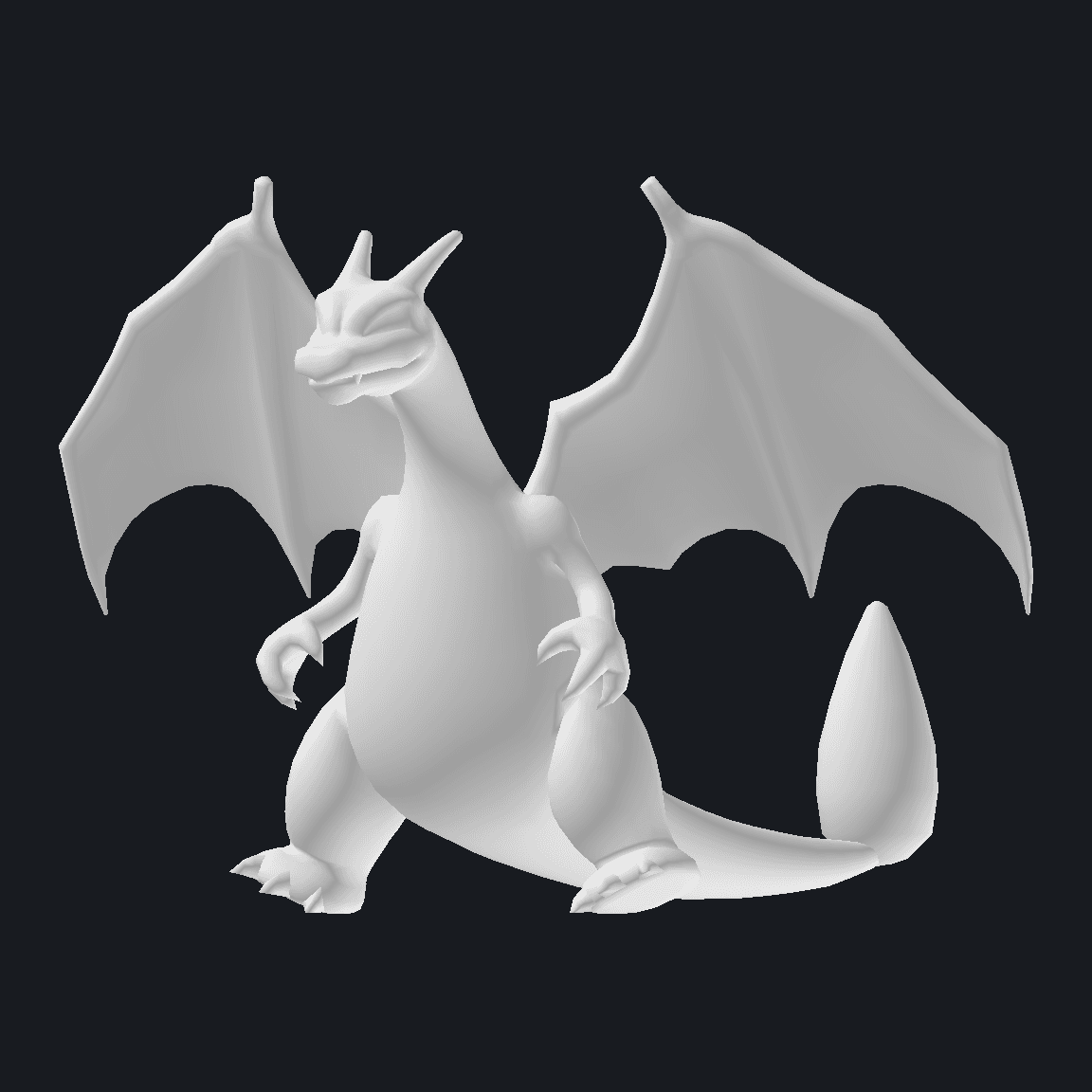 | 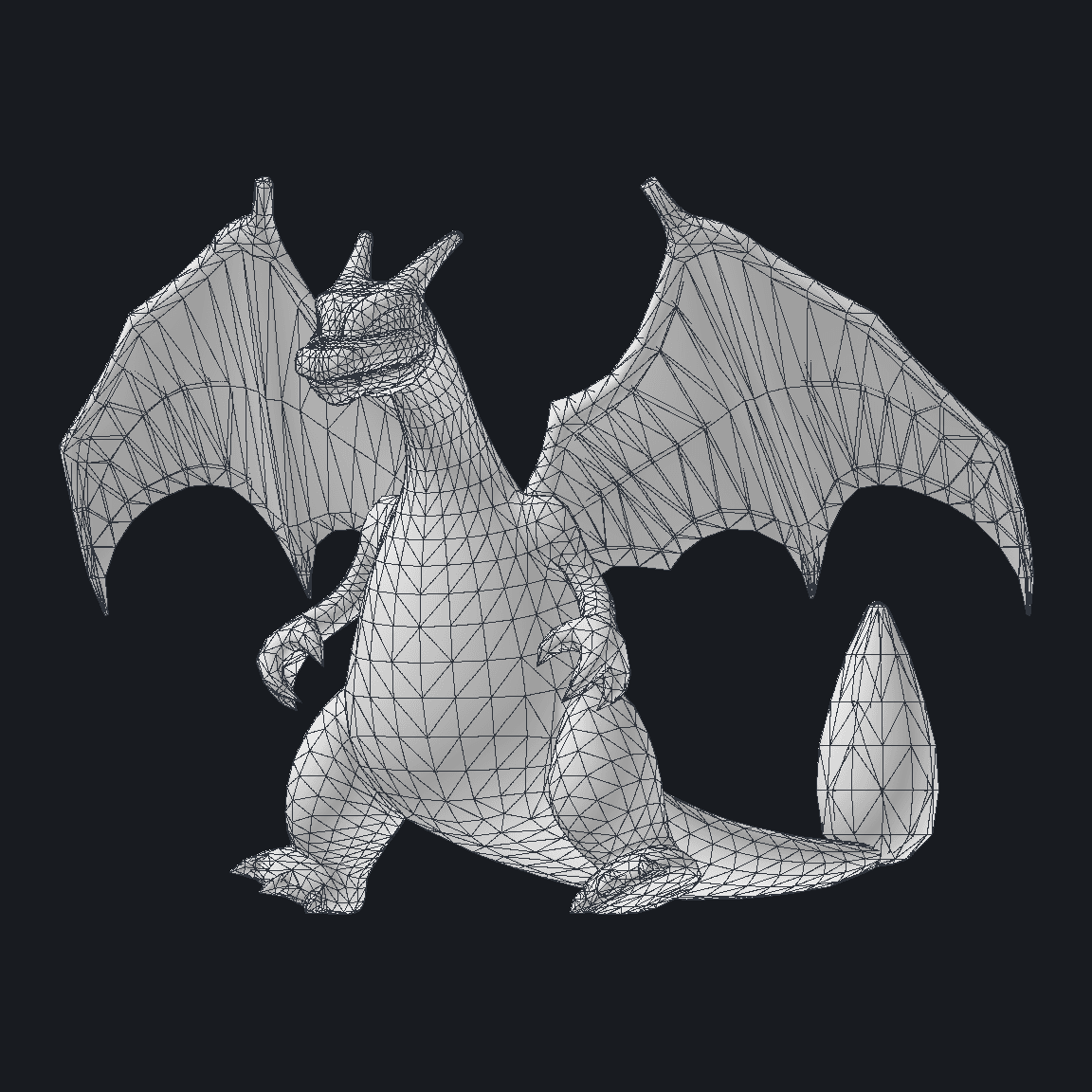 |
Both views use the same mesh. Smooth shading interpolates the vertex normals across triangles; the polygon view draws the triangle edges directly to show the mesh topology. For an overview of mesh elements and how normals affect shading, see the Blender Manual's Mesh Structure.
Bringing Charizard's textures back
The white mesh gives us the shape, but its materials are what tell the renderer how to paint and shade it. In the GFBMDL, each material's texture map points to an entry in TextureNames and names the shader sampler that uses it. That lets us follow a binding from the material, to the texture inside a BNTX file, and then to the part it plays in the render.
For Charizard's BodyA, those lookups lead from each sampler through its TextureNames index to a BNTX entry in the GFPAK. The indices below are the GFBMDL texture-name indices; the BNTX entry numbers are hexadecimal GFPAK file-table indices.
| Shader sampler | TextureNames index | BNTX texture name | GFPAK entry |
|---|---|---|---|
Col0Tex | 6 | pm0006_00_BodyA_col | 0x34, 0x35 |
ColSdw0Tex | 7 | pm0006_00_BodyA_sdw | 0x36, 0x37 |
AmbientTex | 8 | pm0006_00_BodyA_amb | 0x33 |
LightTblTex | 4 | pm0006_00_lta | 0x42 |
The GFPAK unpack step exposes the .bntx files. BNTX is Nintendo Switch's texture container format; its internal structure is described in these BNTX format notes. The .bntx entries can be opened in Switch Toolbox, a reference reader, to view and export the contained images as PNG.
| Exported image | Sampler and contents | Size |
|---|---|---|
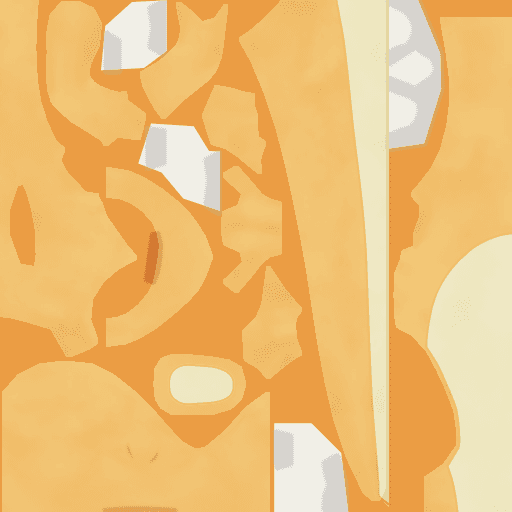 | Col0Tex · painted base color, pm0006_00_BodyA_col | 512 × 512 |
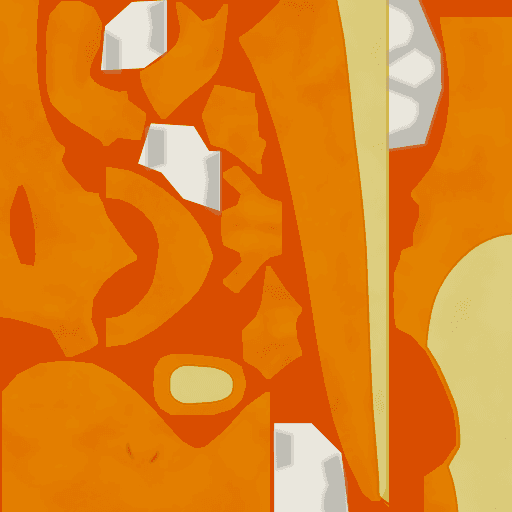 | ColSdw0Tex · painted shadow color, pm0006_00_BodyA_sdw | 512 × 512 |
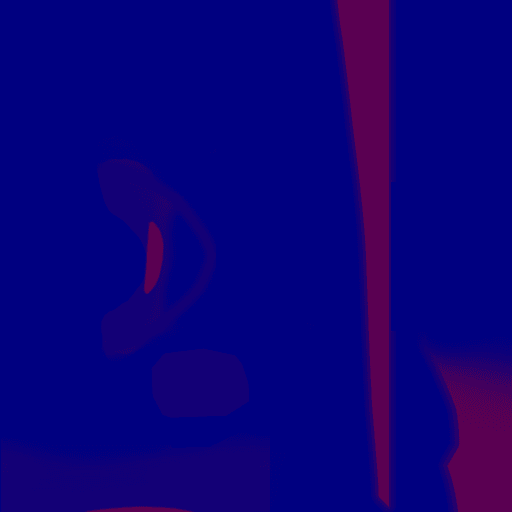 | AmbientTex · red, green, and blue lighting masks, pm0006_00_BodyA_amb | 512 × 512 |
 | LightTblTex · lookup ramp, pm0006_00_lta | 512 × 8 |
Each TextureMaps entry in the GFBMDL binds a sampler to a texture index and stores its addressing parameters. BodyA uses Mirror on U and Repeat on V for the color, shadow, and ambient maps. Its ColorUVScaleU is 2 and ColorUVScaleV is 1, so those maps use a doubled U coordinate before the sampler wraps it. LightTblTex clamps on both axes. The Mirror, Repeat, and Clamp values are the GFBMDL WrapMode values read by the reference implementation.
Following BodyA's texture inputs into the shader
The images above have different jobs in the shader. Col0Tex supplies the base color, and ColSdw0Tex supplies its painted shadow version. The red and green channels in AmbientTex add deep-shadow and shadow masks; its blue channel shifts the lighting lookup. LightTblTex is a ramp: the shader looks up the deep-shadow and shadow weights there, then assigns the remainder to the lit color.
The source for each input is in a different place:
- The GFBMDL
TextureMapsandTextureNamesconnect the sampler to a BNTX texture. Its materialValues,Colors, andSwitchesstore controls such asLightTblIndex,DeepShadowColor,LightMul, and whether the ambient map and light table are enabled. - The GFBMDL vertex buffer stores the surface normals used for
N. - The BNTX image bound to
LightTblTexstores the ramp itself. It is separate from the scene-light data.
At this texture stage, the preview holds N·L at 0.5 so the texture inputs and weight calculation can be inspected without scene lighting. This is a fixed preview value, not a value read from the game. The shader stage uses a hardcoded light direction; the game-supplied direction is introduced in the lighting section.
For this material, the light-table row comes from LightTblIndex = 4. The lookup coordinate uses the normal and light directions, with the blue ambient channel shifting the value before the ramp is sampled:
Here, B is the blue channel of AmbientTex. Its red and green channels then adjust the weights: red adds deep shadow, while green moves some of the lit weight into shadow.
where R and G are the red and green channels of AmbientTex. The adjusted weights still sum to one. Here, colBase and colShadow are the material-adjusted base and shadow color inputs; Charizard's BodyA constant-color tints are white, so they leave the sampled maps unchanged. The shader applies the weights, applies DeepShadowColor to the deep-shadow contribution, then multiplies the result by LightMul:
The strip separates the source textures from the values calculated from them. The first three panels show the sampled Col0Tex, ColSdw0Tex, and AmbientTex inputs; LightTblTex, the fourth texture input, is shown separately in the texture table above. Adjusted weights are calculated from the light-table lookup and ambient channels. Labels below the panels identify each texture input, adjusted weight, weighted contribution, and final sum. The texture-space calculation holds at , uses nearest ramp texels, and leaves out geometry and specular, rim, and emission terms.


Applying the texture maps across Charizard
The six full-model views apply each material's own textures to its mesh, using the sampler's UV scale and wrap settings. The first three show the Col0Tex, ColSdw0Tex, and AmbientTex inputs mapped onto the mesh. The last three show the lit contribution, then lit plus shadow, then the complete sum with deep shadow. Labels below the views identify each input or the weighted terms included in that stage. The primed weights are the adjusted values shown in the preceding strip, and LightMul is applied after each cumulative sum. The preview holds at ; the detached fire-mask geometry is left out for the later effects step.7

Decoding the BNSH vertex and fragment shaders
The material table shows which textures each sampler uses. The material's ShaderGroup tells us which shader path consumes them. PokeDefaultShader is LGPE's main uber-shader: it handles most body and eye materials, with each material's values, switches, colors, and texture bindings selecting the surface behavior.
Charizard's GFPAK also contains separate fire paths, but its materials only show us the groups used by Charizard. To get the wider picture, I scanned all 209 pm*.gfpak archives in romfs/bin/archive/pokemon, skipping the separate bd partner Pikachu and Eevee archives. For each archive, the scan reads every GFBMDL entry and records the ShaderGroup assigned to each material. I then grouped those records by shader name and cross-referenced them to the Pokemon ID, model entry, and material. I majorly found six distinct groups across 1,618 material records.8
The shader groups used by LGPE Pokemon
Material ShaderGroup | Scan result |
|---|---|
PokeDefaultShader | 1,460 materials across 418 GFBMDL entries and 154 distinct pm IDs. This is the shared, data-driven route used by most Pokemon materials, often called an uber-shader: material values, switches, colors, and textures select each material behavior. |
PokeDefaultShaderNone | 18 materials across 8 GFBMDL entries: Grimer, Magmar, and Muk. |
PokeFireCoreShader1 | 66 materials across 26 GFBMDL entries: Charizard, Charmander, Charmeleon, Gastly, Koffing, Magmar, Alolan Marowak, Moltres, Ponyta, Rapidash, and Weezing. |
PokeFireMaskShader1 | 52 materials across 20 GFBMDL entries: Charizard, Charmander, Charmeleon, Magmar, Alolan Marowak, Moltres, Ponyta, and Rapidash. |
PokeSmokeMaskShader1 | 14 materials across 6 GFBMDL entries: Gastly, Koffing, and Weezing. |
PokeMegaGangarShader | 8 materials across 2 GFBMDL entries for Mega Gengar. (Rising purple smoke effects) |
This scan found six shader-group names, shared across the roster. Fire pokemon with emissive flames use the FireCore and FireMask groups. Mega Gengar has its own group; that is a special case. The groups belong to materials, so one GFBMDL can use more than one shader path.
In Charizard's base model, the material groups land on different meshes:
| Mesh and materials | ShaderGroup | Stages in the GFPAK |
|---|---|---|
| BodySkin: Eye, BodyA, BodyB | PokeDefaultShader | Eye, BodyA, and BodyB each have a .bnsh_vsh and a .bnsh_fsh stage. |
| FireAStenSkin: FireCore | PokeFireCoreShader1 | FireCore.bnsh_vsh and FireCore.bnsh_fsh. |
| FireCore1Skin, FireCore2Skin, FireCore3Skin: FireMask | PokeFireMaskShader1 | FireMask.bnsh_vsh and FireMask.bnsh_fsh. |
This is why the group names are read from each material: the body and the flame use separate shader paths even though they are in the same model.
What BNSH contains, and why decode it
A BNSH entry contains compiled shader code for the Switch GPU. The extracted stage suffix tells us which part of the rendering pipeline it belongs to: .bnsh_vsh is the vertex shader, and .bnsh_fsh is the fragment shader. The vertex stage transforms mesh vertices and passes values such as UV coordinates to the next stage. The fragment stage runs for the covered pixels, samples textures, and calculates their color.
BNSH is compiled Maxwell shader code, not readable GLSL source. The bnsh-decoder converts it to SPIR-V and writes reflection data for resources such as constant buffers and samplers. SPIR-V is a standard intermediate representation (Khronos SPIR-V docs) between the compiled shader and source-like output. SPIRV-Cross converts that SPIR-V to GLSL. That GLSL gives us a way to inspect the shader's operations and translate the rendering path to OpenGL. It is reconstructed output, not Game Freak's original shader source.
Decoding Charizard's default uber-shader
Charizard's BodyA material uses PokeDefaultShader, so its BNSH pair gives us a concrete example of the main path. The unpacker keeps the folder under its GFPAK hash, D6933DF07D76F5EE, and recovers the stage filenames. From the Switch-Toolbox repository root, these commands convert the vertex and fragment stages:
node Tools/decode_bnsh.js "./unpacked/pm0006_00/D6933DF07D76F5EE/BodyA.bnsh_vsh" ./decoded BodyA_vsh
Tools/SpirvCross/spirv-cross.exe ./decoded/BodyA_vsh.spv --output ./decoded/BodyA_vsh.glsl --no-es --version 450
node Tools/decode_bnsh.js "./unpacked/pm0006_00/D6933DF07D76F5EE/BodyA.bnsh_fsh" ./decoded BodyA_fsh
Tools/SpirvCross/spirv-cross.exe ./decoded/BodyA_fsh.spv --output ./decoded/BodyA_fsh.glsl --no-es --version 450
The converted vertex stage declares the inputs that come from the GFBMDL:
layout(location = 0) in vec4 in_attr0;
layout(location = 1) in vec4 in_attr1;
layout(location = 3) in vec4 in_attr3;
layout(location = 11) in vec4 in_attr11;
layout(location = 12) in vec4 in_attr12;
The names are generated by the converter, so the locations have to be compared with the GFBMDL attribute descriptors to identify the position, UV, and skinning inputs. The fragment stage has nine numbered texture samplers. For BodyA, the sampler order lines up with the material's TextureMaps list. These converted lines show four of the texture reads:
gpr_256 = texture(SPIRV_Cross_Combinedtexture_0sampler_0, vec2(gpr_23, gpr_20)).x;
gpr_256 = texture(SPIRV_Cross_Combinedtexture_2sampler_2, vec2(gpr_23, gpr_20)).x;
gpr_256 = texture(SPIRV_Cross_Combinedtexture_4sampler_4, vec2(gpr_7, gpr_6)).x;
gpr_256 = texture(SPIRV_Cross_Combinedtexture_6sampler_6, vec2(gpr_1, gpr_4)).x;
The slot names are generic, but the GFBMDL material table supplies the missing names. Matching BodyA's numbered GLSL samplers to its TextureMaps entries gives us:
| GLSL texture slot | BodyA sampler | BNTX texture |
|---|---|---|
| 0 | Col0Tex | pm0006_00_BodyA_col |
| 2 | ColSdw0Tex | pm0006_00_BodyA_sdw |
| 4 | AmbientTex | pm0006_00_BodyA_amb |
| 6 | LightTblTex | pm0006_00_lta |
The decoded fragment is still a long sequence of register operations. After matching the sampler slots, material values, and switches, the OpenGL implementation can express that same path with named inputs and the lighting calculation shown above.
From ramp weights to the fragment color
The texture preview stops at the ramp-weighted color. The OpenGL reconstruction takes that result through several more steps: emission adjusts the ramp weights; optional specular, sphere-map, and rim terms are added; then the material's final color controls are applied.
In the rendered image, the ramp weights choose between the base, shadow, and deep-shadow colors. Specular adds bright highlights where the surface faces both the light and camera. A sphere map can add a view-dependent reflection tint; BodyA's sampler is bound to dummy_col. The rim term brightens edges that turn away from the camera, helping the model stand out from the background.
Advanced shader details
N is the surface normal, L the light direction, and V the view direction. R, G, and B are the red, green, and blue channels of AmbientTex; w' denotes weights after its red and green masks. A is LightAmbient. When the emission mask is enabled, E_r and E_g are its sampled red and green channels:
When the emission mask is disabled, t=1 and m=0.
The ramp color is the weighted sum of three contributions:
For Charizard BodyA, t=1 and A=1, so the ramp weights remain the adjusted values shown in the texture section.
The Blinn-Phong specular term uses the half-vector H=normalize(L+V). It runs when SpecularScale > 0; SpecularMaskEnable controls whether m attenuates the term, rather than gating the term itself. The ambient red and green channels also reduce specular in masked regions:
When enabled, the sphere-map sample along the reflected view vector is added after the ramp:
The rim term runs when RimStrength > 0; RimMaskEnable controls whether m attenuates it. It depends on the view-facing angle, the ramp light term, and the material rim colors. With n_v=max(N dot V,0), ndl=N dot L + 2(B-0.5), and C_before=C_ramp+S_spec+S_sphere:
After the rim pass, EffectTex, ConstantColor, OnGameEmissionVal, and OnGameColor apply the final material controls. The effect map is sampled at (0,1):
This last expression applies the renderer's 1/2.2 output gamma, an approximation to sRGB encoding. Alpha follows its separate material path.9 If is the alpha selected by the material's texture and mask logic, its final adjustment is:
The material-controlled values in these expressions come from BodyA's GFBMDL Values, Colors, Switches, and TextureMaps; its evidence lists SpecularScale=0.25, SpecularPower=6, RimPower=6, RimStrength=6, RimLimit=2, and LightMul=1. EffectTex binds to projection_effect_col; EmissionMaskTex and SphereMapTex bind to dummy_col.7
At this stage, the shader calculates N·L with the preview renderer's fixed light direction. The lighting pass below reads L from LGPE's EnvDirLight0.gfblt.
The comparison keeps the mesh pose and camera fixed. The left panel shows the final weighted sum; the right shows the same materials through PokeDefaultShader.10

Decoding the FireCore stages
For Charizard's FireCore pair, the extraction names the two stages FireCore.bnsh_vsh and FireCore.bnsh_fsh. The conversion steps use the repository decoder and SPIRV-Cross:9
node Tools/decode_bnsh.js "./unpacked/pm0006_00/D6933DF07D76F5EE/FireCore.bnsh_vsh" ./decoded FireCore_vsh
Tools/SpirvCross/spirv-cross.exe ./decoded/FireCore_vsh.spv --output ./decoded/FireCore_vsh.glsl --no-es --version 450
node Tools/decode_bnsh.js "./unpacked/pm0006_00/D6933DF07D76F5EE/FireCore.bnsh_fsh" ./decoded FireCore_fsh
Tools/SpirvCross/spirv-cross.exe ./decoded/FireCore_fsh.spv --output ./decoded/FireCore_fsh.glsl --no-es --version 450
The generated vertex GLSL exposes the input locations. Here, location 3 maps to UV1 in the GFBMDL vertex attributes:
layout(location = 0) in vec4 in_attr0;
layout(location = 1) in vec4 in_attr1;
layout(location = 3) in vec4 in_attr3;
The fragment GLSL shows that the first sampler reads a screen-space value with texelFetch:
gpr_256 = texelFetch(
    SPIRV_Cross_Combinedtexture_0SPIRV_Cross_DummySampler,
    ivec2(floatBitsToInt(gpr_4), floatBitsToInt(gpr_1)),
    int(0u)).x;
Names such as in_attr3 and gpr_4 come from the converted shader; they do not tell us the source meaning by themselves. The vertex input location has to be matched against the GFBMDL attributes, and the sampler and constant-buffer locations have to be matched against the material's TextureMaps, TextureNames, Values, Switches, and Colors. In the FireCore fragment stage, sampler 0 is the viewport mask render target. The material's placeholder binding is replaced with that target when the renderer draws the flame.
After matching the constant-buffer slots and sampler names to the material data, the FireCore fragment color can be summarized as:
rim = pow(1.0 - max(dot(viewDir, normal), 0.0), RimPower) * RimStrength;
baseColor = mix(BaseColor0, BaseColor1, ColorLerpValue) + rim * BaseRimVal;
layerColor = mix(LayerColor0, LayerColor1, ColorLerpValue) + rim * LayerRimVal;
blend = min(LerpTex.r + (Blend1Tex.r + Blend0Tex.r) * (1.0 - LerpTex.a), 1.0);
color = mix(baseColor, layerColor, blend);
In this shorthand, viewDir and normal are the interpolated view and surface directions. The endpoint colors, rim controls, and ColorLerpValue come from the FireCore material; Blend0Tex, Blend1Tex, and LerpTex are bound texture samples, with only the red and alpha channels shown used by the blend expression. The color pair selects normal or shiny colors, the blend maps move between base and flame layer, and the rim terms brighten the view-facing edge. The FireMask output controls the flame alpha separately.
Following the FireMask and FireCore passes onto the mesh
The vertex and fragment stages make the most sense when we follow the FireMask and FireCore materials together. FireMask draws the flame mask mesh into an off-screen, viewport-sized buffer. It discards mask samples below the material threshold (about 0.999) and writes coverage and a material ID there, rather than a visible flame color. Reduced to the behavior in the decoded passes, the two stages do this:
mask.x = min(mask0 + mask1, 1.0) * intensity;
mask.y = mask.x * ((MatLinkID + 1) / 4095.0);

if (abs(mask.y - expectedId) > 1.0 / 40950.0) discard;
fireColor.a *= mask.x;
Here, mask0 and mask1 are the sampled coverage inputs, intensity is the mask scale, and MatLinkID is the per-material link value. expectedId is (MatLinkID + 1) / 4095.0. FireCore reads the buffer at the current pixel, checks that the encoded ID belongs to its material, and uses the coverage value to shape the flame alpha. Without the mask pass, the FireCore surface is a smooth sheet; the mask creates the cut-out flame tongues.
The second comparison adds the FireMask and FireCore passes to the default-shader body. The pose and camera stay fixed, so the difference comes from the flame passes.10

Replacing the renderer light with LGPE's scene light
The shader still needs a direction for L. In the texture preview, N·L was fixed at 0.5; in the first full shader renders, the renderer used its hardcoded key-light direction. Neither value came from the scene-light record.
For the lighting pass, I read EnvDirLight0.gfblt from romfs/bin/field/draw_env/default. At byte offset 0x28, the record stores three little-endian 32-bit floats for the direction the light travels. The shader needs the direction from the surface toward the light, so the renderer negates and normalizes those values before calculating N·L:
The bytes at this offset decode as a direction vector with a length close to 1. The rest of the record remains unmapped.11
xxd -g 4 -s 0x28 -l 0x0c "romfs/bin/field/draw_env/default/EnvDirLight0.gfblt"
00000028: 00000000 761b44bf c18d24bf           ....v.D...$.
I read the three values with numpy.frombuffer(data, dtype="<f4", count=3, offset=0x28). The offset starts at the X component; the next two floats are at 0x2c and 0x30. NumPy's frombuffer documentation explains the buffer offset and count, and its dtype documentation defines < as little-endian and f4 as a four-byte float.
That gives x = 0.0, y = -0.766044020652771, and z = -0.6427879929542542. Their length is approximately 1, which supports reading these values as a direction vector.
The parsed travel vector is (0.0, -0.766044020652771, -0.6427879929542542). After negating and normalizing it, the shader receives (-0.0, 0.7660440798434591, 0.6427880426211957).
The dot product is still calculated per surface: each fragment has its own normal N, while this scene record supplies the shared direction L. LightTblTex then turns the resulting N·L into toon-ramp weights, with the ambient mask adjusting those weights as described above.
The shader then applies LightAmbient to the lit-band weight:
Here, A is the shader's LightAmbient coefficient, and t is the emission blend defined above. The renderer supplies A=1.0 for these renders; with Charizard BodyA's t=1, that leaves its adjusted lit weight unchanged.
The dump contains 54 .gfblt files. Thirty-six are in bin/field/draw_env, arranged into four named sets:
| Environment set | Directional-light files | Ambient-light files | Shadow-light file |
|---|---|---|---|
default | EnvDirLight0.gfblt through EnvDirLight3.gfblt | EnvAmbLight0.gfblt through EnvAmbLight3.gfblt | EnvShadowLight.gfblt |
dungeon | EnvDirLight0.gfblt through EnvDirLight3.gfblt | EnvAmbLight0.gfblt through EnvAmbLight3.gfblt | EnvShadowLight.gfblt |
room | EnvDirLight0.gfblt through EnvDirLight3.gfblt | EnvAmbLight0.gfblt through EnvAmbLight3.gfblt | EnvShadowLight.gfblt |
test | EnvDirLight0.gfblt through EnvDirLight3.gfblt | EnvAmbLight0.gfblt through EnvAmbLight3.gfblt | EnvShadowLight.gfblt |
Each set has nine records, giving 16 directional-light files across the four sets. Another 16 files are in bin/demo/res/common/light, and two character-environment files are in bin/chara/data/env/gg. These are files available in the dump, not 54 lights active in one scene.
The folder names map the field records to default, dungeon, room, and test lighting sets. The material's LightSetNo = 0 selects directional slot 0; this comparison supplies that slot from default/EnvDirLight0.gfblt.
The default ambient record stores its RGBA color at 0x34. Reading those four little-endian floats gives:
xxd -g 4 -s 0x34 -l 0x10 "romfs/bin/field/draw_env/default/EnvAmbLight0.gfblt"
00000034: 0000803f 0000803f 0000803f 0000803f  ...?...?...?...?
All four RGBA channels in the default scene's EnvAmbLight0.gfblt read as 1.0. They numerically match the renderer's A=1.0, but the Pokémon fragment shader has no input for EnvAmbLight records: it reads ambient as the separate scalar cbuf_1[0].x. That runtime scalar has not been captured, so the matching values do not establish a link between the file record and the shader input.
The decompressed ExeFS contains paths for EnvDirLight0.gfblt through EnvDirLight3.gfblt and EnvAmbLight0.gfblt through EnvAmbLight3.gfblt. In the decoded Pokemon fragment shader, cbuf_7[0].xyz supplies the directional vector. AmbientTex provides material masks separately from the scene EnvAmbLight records.
The pose, camera, and shader passes stay the same across this comparison.

Animating Charizard's battle wait
The static render shows the model's bind pose. The archive survey points to ba10_waitA01 for Charizard's battle wait; its .gfbanmcfg entry resolves to pm0006_00_ba10_waitA01.gfbanm. That gives us a specific clip to follow from its stored tracks to moving joints.
Reading the GFBANM tracks
A .gfbanm is a FlatBuffer animation file. The GFBANM reference reader and its generated accessors show the animation fields and track types used below.
The root Animation record groups several kinds of tracks. Each track is attached to a named bone, material, or mesh group; the name connects it back to the corresponding record in the GFBMDL.
| GFBANM component | Stored data | What it changes |
|---|---|---|
AnimConfig | KeyFrames, FramesPerSecond | Clip length and its declared frame rate. Charizard's ba10_waitA01 has 49 frames at 30 fps. |
Bones | Bone name and scale, rotation, and translation tracks | Updates the matching GFBMDL bone's local transform. |
Groups | Named visibility tracks | Changes whether a model group is drawn. The reader treats bit 0 as the draw flag. |
Materials | Named switches, scalar values, and vectors | Animates material parameters, including the flame's UV offsets in loop01. |
Triggers | Name, start and end frames, parameter | Stores timed trigger records. The reference reader exposes this data shape but does not apply triggers in its current playback path. |
Tracks can hold one fixed value, one value per frame, or values paired with explicit 8-bit or 16-bit frame indices. When two keys surround the sampled frame, a scalar or vector channel is interpolated between them:
A quaternion is a four-number way to represent a 3D rotation. The animation reader uses it to rotate each bone and interpolate smoothly between keyed poses. For a visual introduction, see the University of Illinois quaternion rotation notes.
Rotation tracks store compact quaternion components. The reader unpacks each key into a quaternion and uses spherical interpolation between the surrounding rotations. The resulting scale, rotation, and translation form a local bone transform. Parent transforms carry that motion down the skeleton:
Here, is bone 's parent in the GFBMDL. At the vertex stage, each vertex's bone indices and weights combine up to four matrices from the renderer's bone palette. This is the general linear-blend skinning step; GFBMDL supplies the indices and weights, while the animated skeleton supplies the palette:
Here, is the matrix for bone in the palette passed to the vertex shader.
The skeleton-only preview strips away the mesh and shaders so the rig movement is easier to follow. Each orange point marks a transformed bone origin; each line connects a bone to its parent. It shows the animation's joint motion, rather than a Charizard silhouette.
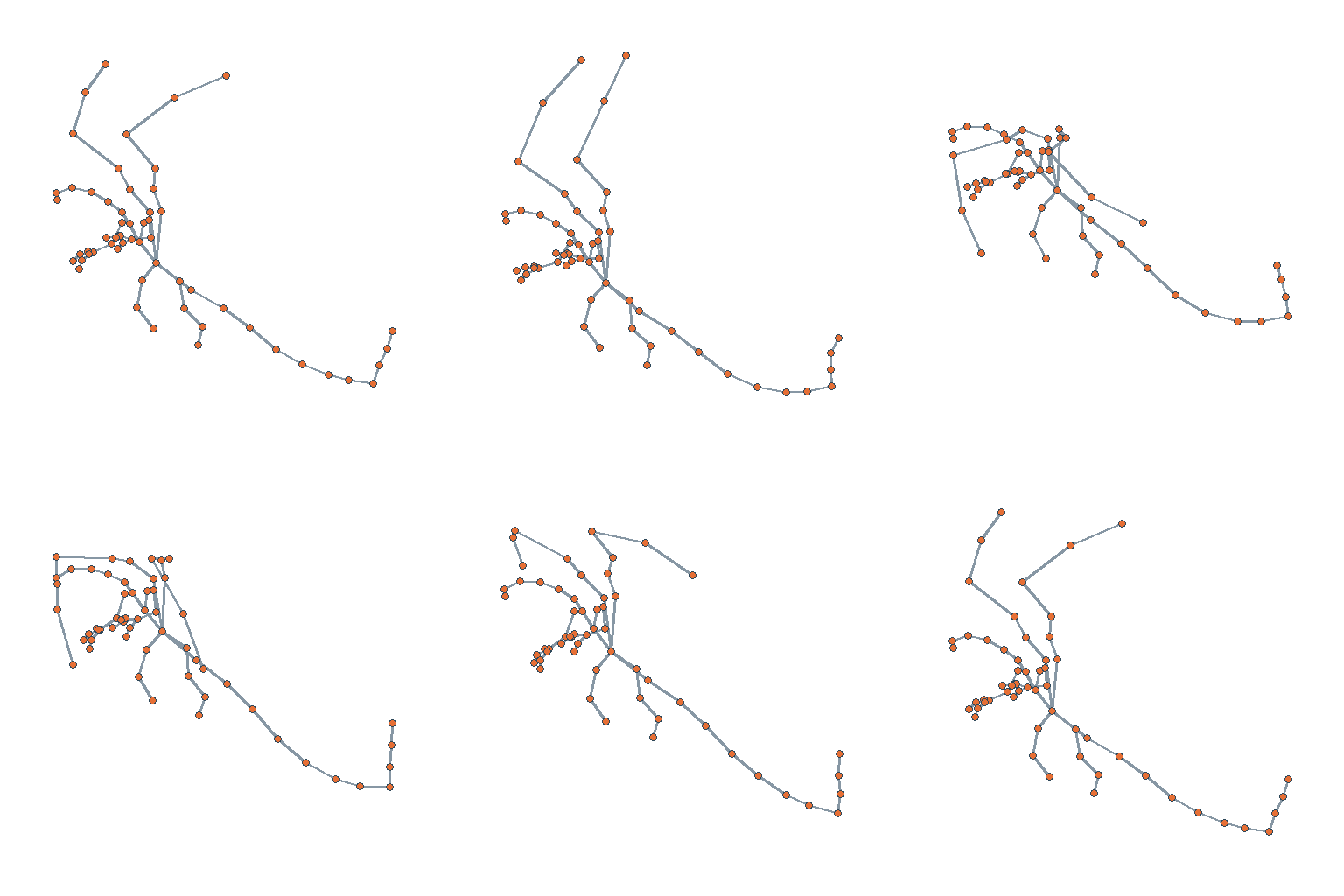
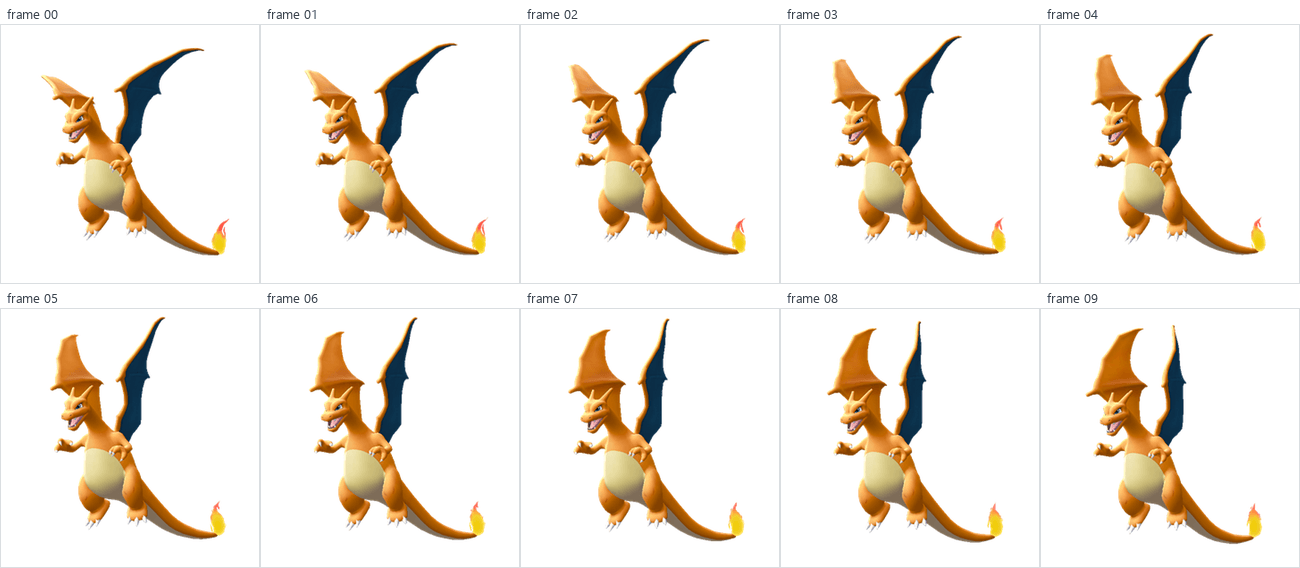
The rendered model keeps Charizard's mesh, PokeDefaultShader materials, and the FireMask and FireCore passes from the previous section, with ba10_waitA01 applied across frames 0–9.
Following the separate flame loop
The flame motion is stored in pm0006_00_loop01.gfbanm. The clip animates both material groups together. FireMask samples FireCoreA1_msk and FireCoreA2_msk to build the coverage written to the off-screen mask buffer. FireCore samples FireStenA1_msk and FireStenA2_msk as Blend0Tex and Blend1Tex; those samples move between its base and layer colors. The mask pass then uses its coverage to shape the visible flame alpha, as shown in the shader section. loop01 updates the UV translation for all four samplers at each sample, so the coverage and color blend stay in sync.
| Material input | BNTX texture | Animated parameters |
|---|---|---|
FireMask.Mask0Texture | FireCoreA1_msk | Mask0UVTranslateU, Mask0UVTranslateV |
FireMask.Mask1Texture | FireCoreA2_msk | Mask1UVTranslateU, Mask1UVTranslateV |
FireCore.Blend0Tex | FireStenA1_msk | Blend0UVTranslateU, Blend0UVTranslateV |
FireCore.Blend1Tex | FireStenA2_msk | Blend1UVTranslateU, Blend1UVTranslateV |
For each input, the shader samples the texture at the mesh UV after applying its scale and animated translation. These samplers use repeat wrapping, so coordinates that pass an edge continue from the opposite edge:
The close-up below shows the rendered flame at the first ten loop01 samples. Each tile is one composite output: FireMask coverage and the two FireCore blend textures are applied together, rather than shown as separate input panels. The full-model GIF below combines this flame motion with the battle-idle animation.
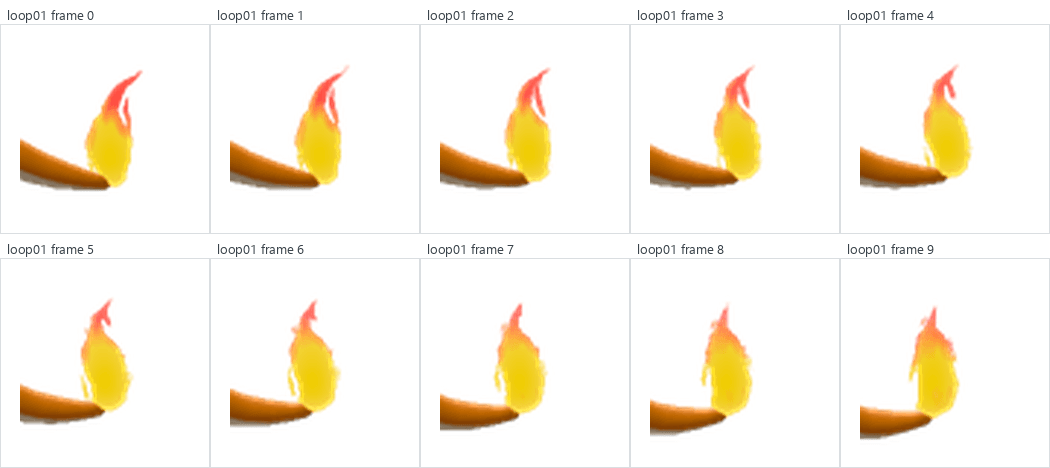
The source files declare 49 frames at 30 fps for ba10_waitA01 and 401 frames at 60 fps for loop01. Omitting their closing samples gives periods of 48 and 400 samples. For the exported GIF, eight body-idle cycles give 384 output frames. The body keeps its existing playback speed; a small speed increase lets the complete flame-material loop finish at the same boundary:
The flame advances about 4.2% faster than the renderer's unfitted material clock. This multiplier is an export setting. Both FireMask and FireCore still use the same loop01 sample, so their coverage and color motion stay together. An extra frame at the repeat boundary matches the first frame pixel-for-pixel.12
Retiming also means sampling between stored UV values. A repeating translation can reset from 1.0 to 0.025 while the texture keeps scrolling forward. Interpolating those numbers directly would move the mask backwards across the texture for one frame. At material sample 40.625, the correct interpolation follows 1.0 to 1.025, giving 1.015625; repeat wrapping then samples the texture at 0.015625.
For a wrap between neighbouring translation samples a and b, with fractional sample position t:
This keeps the flame cut-outs moving continuously through the wrap instead of producing a one-frame jump.12
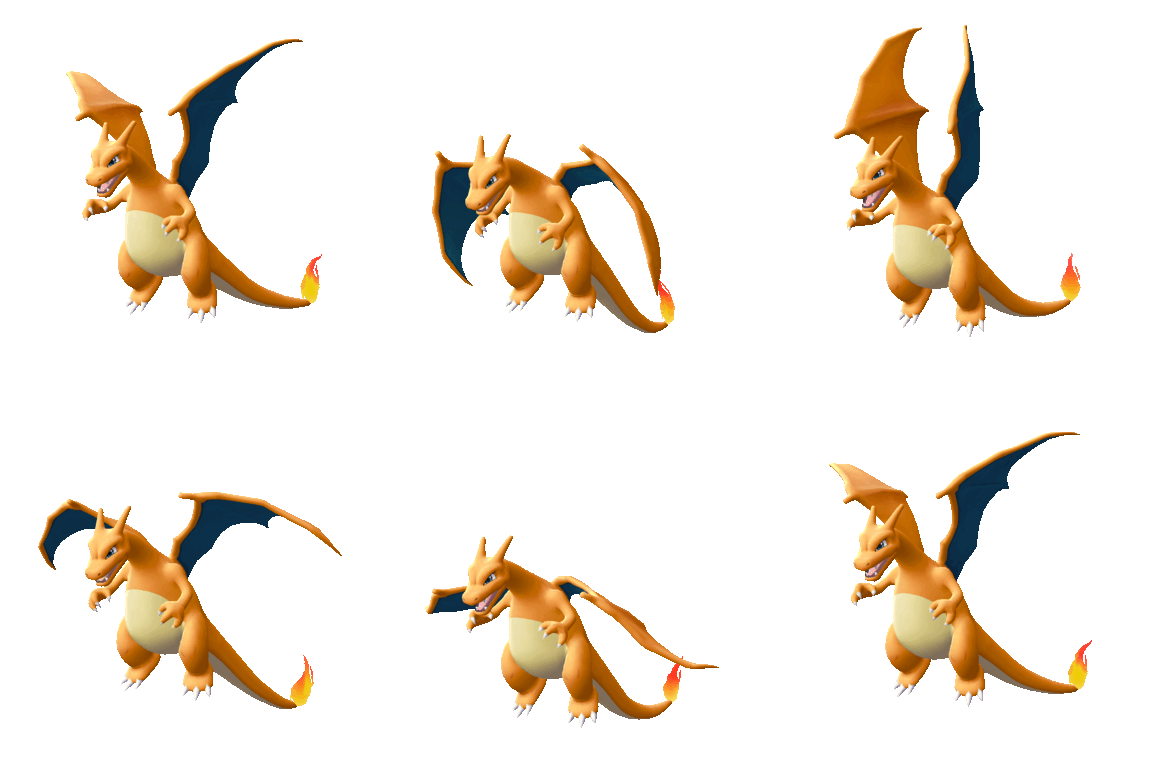
Battle animations
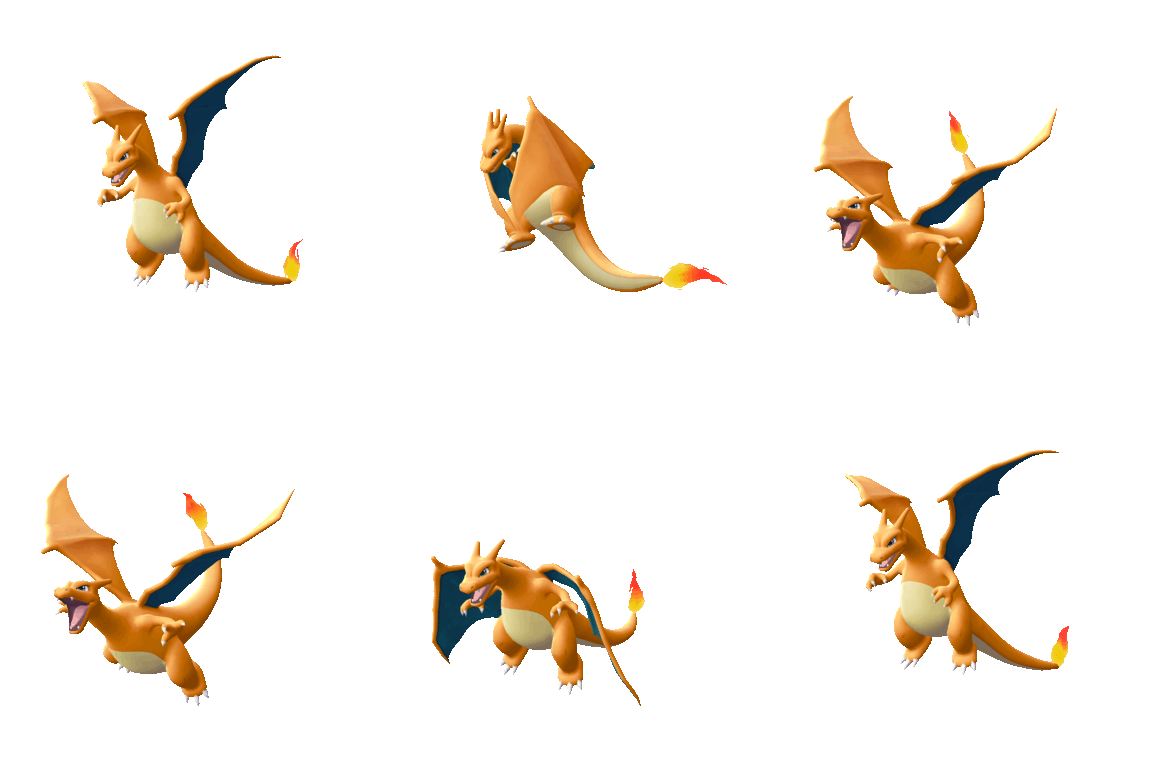
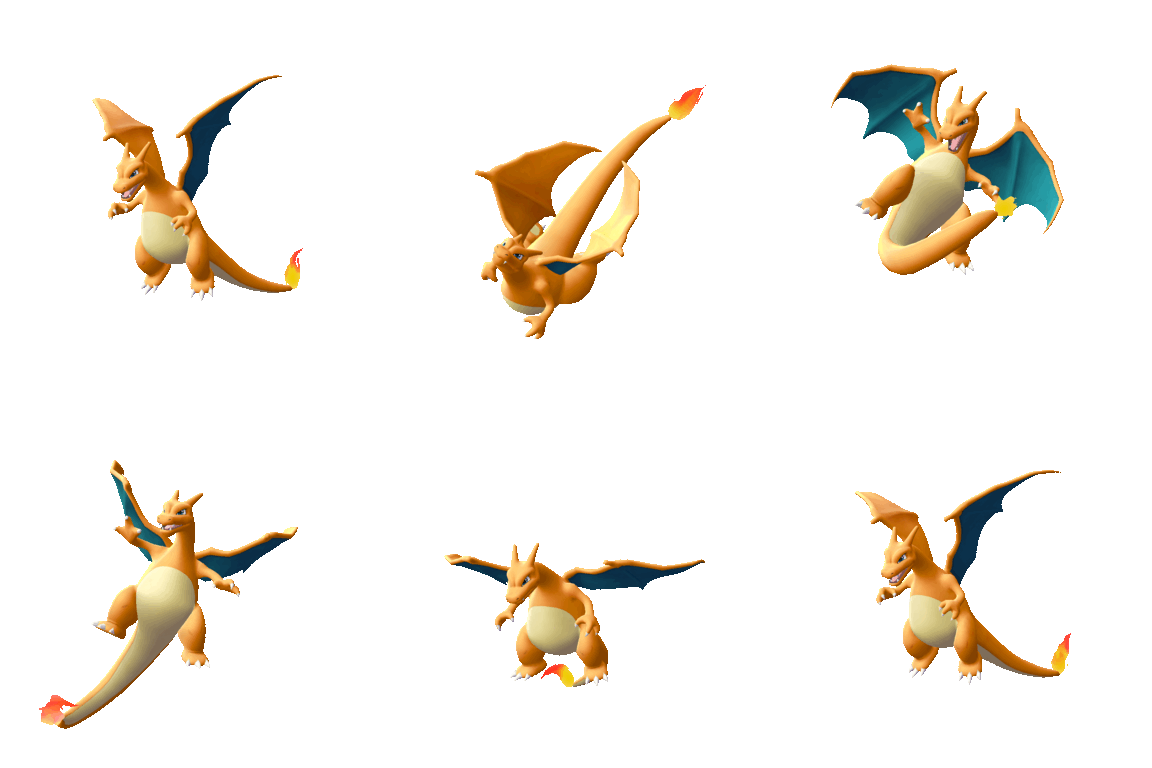
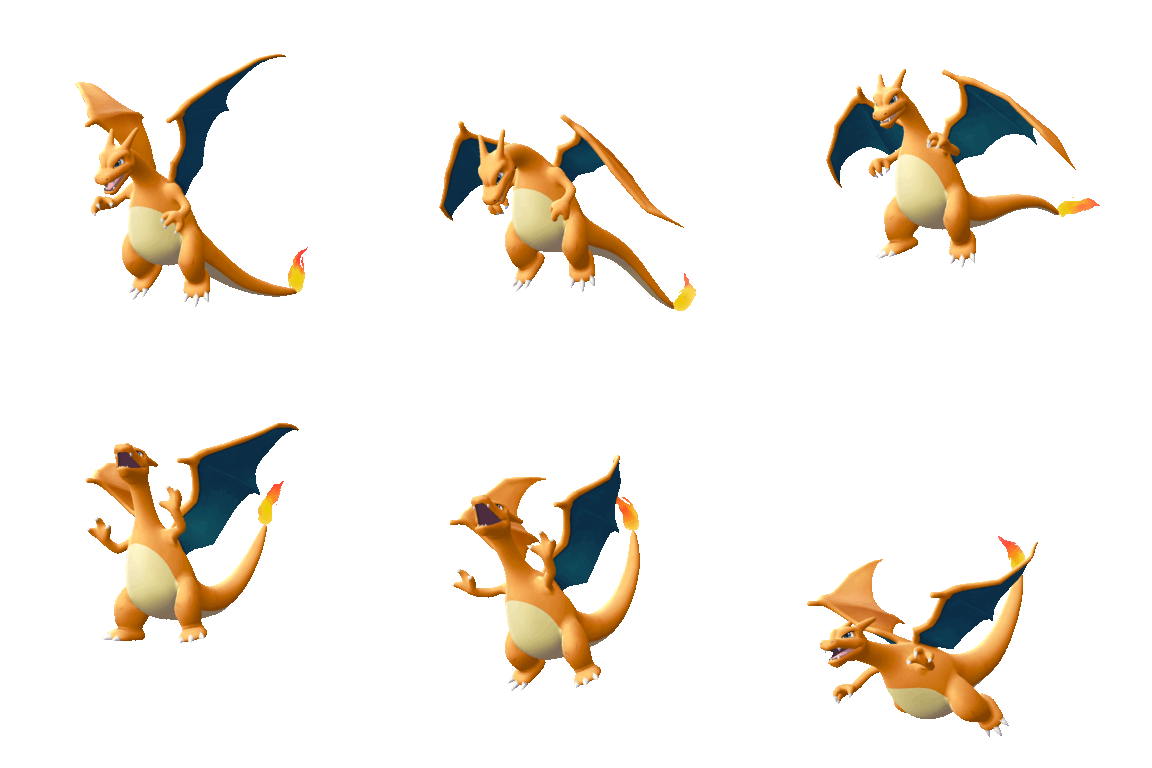
Charizard doesn't spend every battle waiting around :), here are a few more battle animations from its archive:
ba20_buturi01 | ba21_tokusyu01 | ba41_down01 |
|---|---|---|
 |  |  |
Here’s the neat part: the shiny variant is already sitting beside the regular one in the archive. pm0006_00_rare.gfbmdl is the rare model, and the renderer selects its matching _col_rare and _sdw_rare textures for the body. The battle-wait animation and shader passes stay the same, so the palette changes while the pose stays put. The tail flame uses the same fire-mask textures; Charizard has no _rare copies for those.13
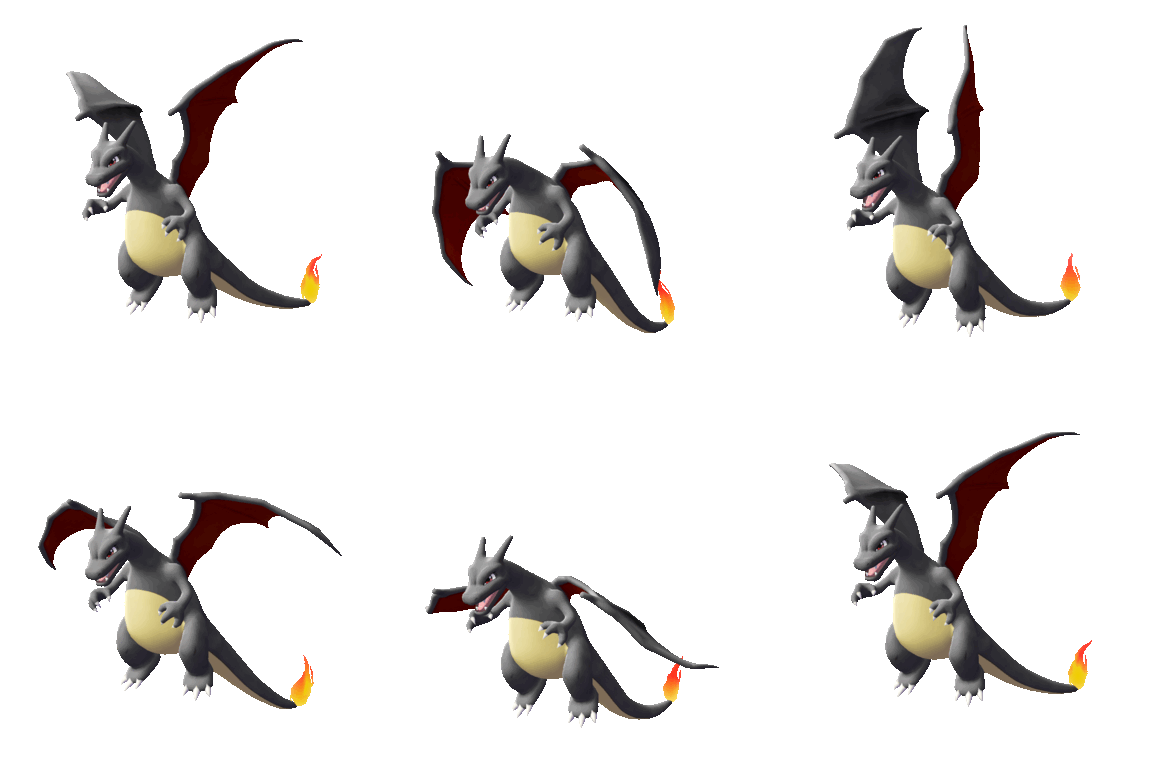
Conclusion
And that’s a wrap ✧。◝(ᵔᗜᵔ)◜✧*。! We've gone from a raw rom extract to proprietary gamefreak asset formats, to a fully generic LGPE model rendering pipeline built from scratch using python. We've additionally also ported the switch specific shader and GPU instructions to a fully generic GLSL shader that can be run on any modern GPU. You can find a dump of the entire LGPE roster assets in PokeAPI which was the initial goal of this project/initiative.
You can view them via the sprites bulk browser:
In the footnotes, I’ve included links to the scripts and evidence used to generate the figures in this post. The scripts are all written in python and can be run on any modern machine with a python interpreter installed. Thanks for reading, and I hope you enjoyed this deep dive into the inner workings of LGPE’s rendering pipeline!
Footnotes
Footnotes
-
[PLACEHOLDER: link
scripts/probe_lgpe_monsname.pyandevidence/monsname-probe.mdafter upload.] ↩ -
[PLACEHOLDER: link
scripts/decode_lgpe_monsname.pyandevidence/monsname-map.tsvafter upload.] ↩ -
[PLACEHOLDER: link
scripts/decode_lgpe_forms.pyandevidence/zkn-form-map.tsvafter upload.] ↩ -
[PLACEHOLDER: link
scripts/unpack_lgpe_gfpak.pyafter upload.] ↩ ↩2 -
[PLACEHOLDER: link the captured animation-reference/hash output after upload.] ↩
-
[PLACEHOLDER: link
scripts/render_lgpe_gfbmdl_mesh.pyandscripts/diagram_lgpe_gfbmdl_mesh.pyafter upload.] ↩ -
[PLACEHOLDER: link
scripts/trace_lgpe_gfbmdl_materials.py,scripts/make_charizard_texture_study.py,scripts/render_charizard_bodya_layers.py, andevidence/charizard-bodya-texture-evidence.jsonafter upload.] ↩ ↩2 -
[PLACEHOLDER: link scripts/scan_lgpe_shader_groups.py, evidence/lgpe-shader-groups.tsv, and evidence/lgpe-shader-roster.tsv after upload.] ↩
-
[PLACEHOLDER: link the BNSH decoding helper, converted Charizard shader excerpts, and material evidence after upload.] ↩ ↩2
-
[PLACEHOLDER: link
scripts/make_lgpe_shader_comparison_grids.pyandevidence/charizard-shader-comparison.jsonafter upload.] ↩ ↩2 -
[PLACEHOLDER: link the GFBLT field probe, shader constant-buffer notes,
scripts/render_charizard_lighting_comparison.py, and renderer reader after upload.] ↩ -
[PLACEHOLDER: link
scripts/render_lgpe_animation_study.py,scripts/compose_lgpe_animation_capture.py,evidence/charizard-animation-capture.json,evidence/charizard-animation-wrap-check.json,images/animation-study/charizard-animation-track-summary.json,evidence/shader-capture-frame0.log,scripts/capture_charizard_battle_animations.py, and the generated skeleton, flame close-up, full-render, and battle-animation figures after upload.] ↩ ↩2 -
[PLACEHOLDER: link
scripts/capture_charizard_shiny_animation.py,evidence/charizard-shiny-capture.json, and the shiny Charizard GIF after upload.] ↩